
How to set up Claude Team: 8 settings that matter.
After you buy the licenses, Claude Team has most things switched on so you can start working right away. That is convenient, but not always safe. These are eight settings worth going through before you invite your team.

1. Who will own the account
Claude Team has four roles. A User works in chats and projects. An Admin invites and removes people. An Owner handles billing, licenses, integrations with other tools, project sharing and other people’s roles. There is only one Primary Owner in the organization, and only they can request a data export.
Recommendation: make a company service account the primary owner, not a specific employee. Anthropic explicitly allows this. When a person leaves, the company does not lose control of the account. Have two owners, not five.
2. Organization instructions for Claude
An owner can write instructions that Claude follows in every chat of every team member. They are limited to 3,000 characters and take precedence over personal instructions. They suit things that should always apply: the company name and what it does, whether to use formal address, how to format answers, what your internal terms mean, that personal data is not written into answers.
Keep them short, without conflicting instructions, and test them in a new chat after saving. A change can take up to an hour to apply.

3. Project sharing
Project sharing is on, and so are public projects that the whole organization can see. Decide in advance whether anyone should be able to create a project visible to everyone. In a company with sensitive data, such as payroll, better turn public projects off and share with specific people.
4. Skills and who may add them
Skills need code execution and file creation turned on. An owner can then add a skill for the whole company, and it is switched on for everyone automatically. Two choices matter:
- Users’ own skills: can people upload their own skills? In a small company yes, in a larger one think it over.
- Publishing to the company library: set it to “requires review” so that every skill passes the owner’s eyes before it is published. The “open” option publishes without review.
5. Connectors and permanent permissions
Connectors link Claude to email, calendar, documents and other systems. Tools that can write or send something ask for approval in Cowork for every task. The setting that allows “always allow” is off by default. Leave it that way until you consciously decide otherwise. Connect only the connectors that the chosen tasks really need.
6. Cowork, auto-approval and the browser
Cowork, where Claude carries out multi-step tasks on its own, is on in the Team plan, as are cloud sessions. New tasks in the Team plan start in auto-approval mode. Anthropic itself warns that because of internet access Cowork carries specific risks, such as hidden instructions on web pages. Decide whether to keep auto-approval as the default and whether to allow the browser.
7. Extra credits and a spending cap
When someone uses up their license limit, they can only continue from prepaid credits, if the owner has allowed them. Credits are billed at API rates, are valid for 12 months and are non-refundable. If you turn them on, set a monthly cap for the whole company and, where available, for individuals too.
8. Single sign-on and employee offboarding
Team supports single sign-on (SSO). If you use Google Workspace or Microsoft 365, signing in through them makes onboarding and offboarding simpler. When someone leaves, remove their license the same day.
| SETTING | DEFAULT | RECOMMENDATION |
|---|---|---|
| Primary owner | Whoever created the account | Company service account |
| Organization instructions | Empty | Short rules for everyone |
| Public projects | On | Depending on data sensitivity |
| Skill publishing | Depends on settings | Requires review |
| Permanent permission for writing tools | Off | Leave off |
| Auto-approval in Cowork | Default for new tasks | Decide consciously |
| Extra credits | Up to the owner | With a monthly cap |
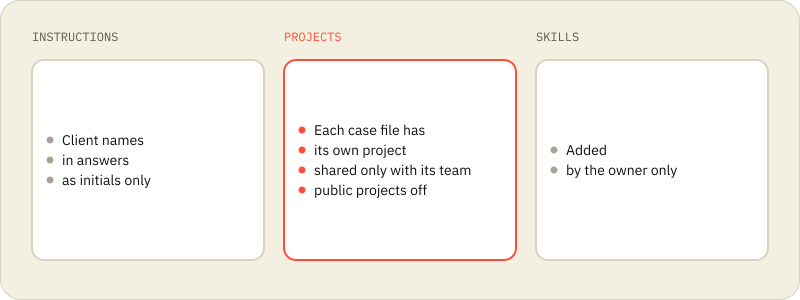
A law firm with 8 people has an instruction that client names are shortened to initials in answers. Public projects are off, and each case file has its own project shared only with those working on it. Only the owner adds skills.
Sources: Claude Help Center, Roles and permissions; Set organization instructions; Control project sharing for your organization; Provision and manage skills for your organization; Use Claude Cowork on Team and Enterprise plans; Manage usage credits for Team plans.
Ask yourself
Who is the primary owner of your company Claude account today, and what happens when they leave?

